Templates that ship in the box
We include the 11 templates most wholesalers and flippers actually use: LOI, purchase agreement, assignment, JV agreement, option-to-purchase, and a few cure-period addenda. They're plain-language, attorney-reviewed in TX, FL, OK, and CA, and editable.
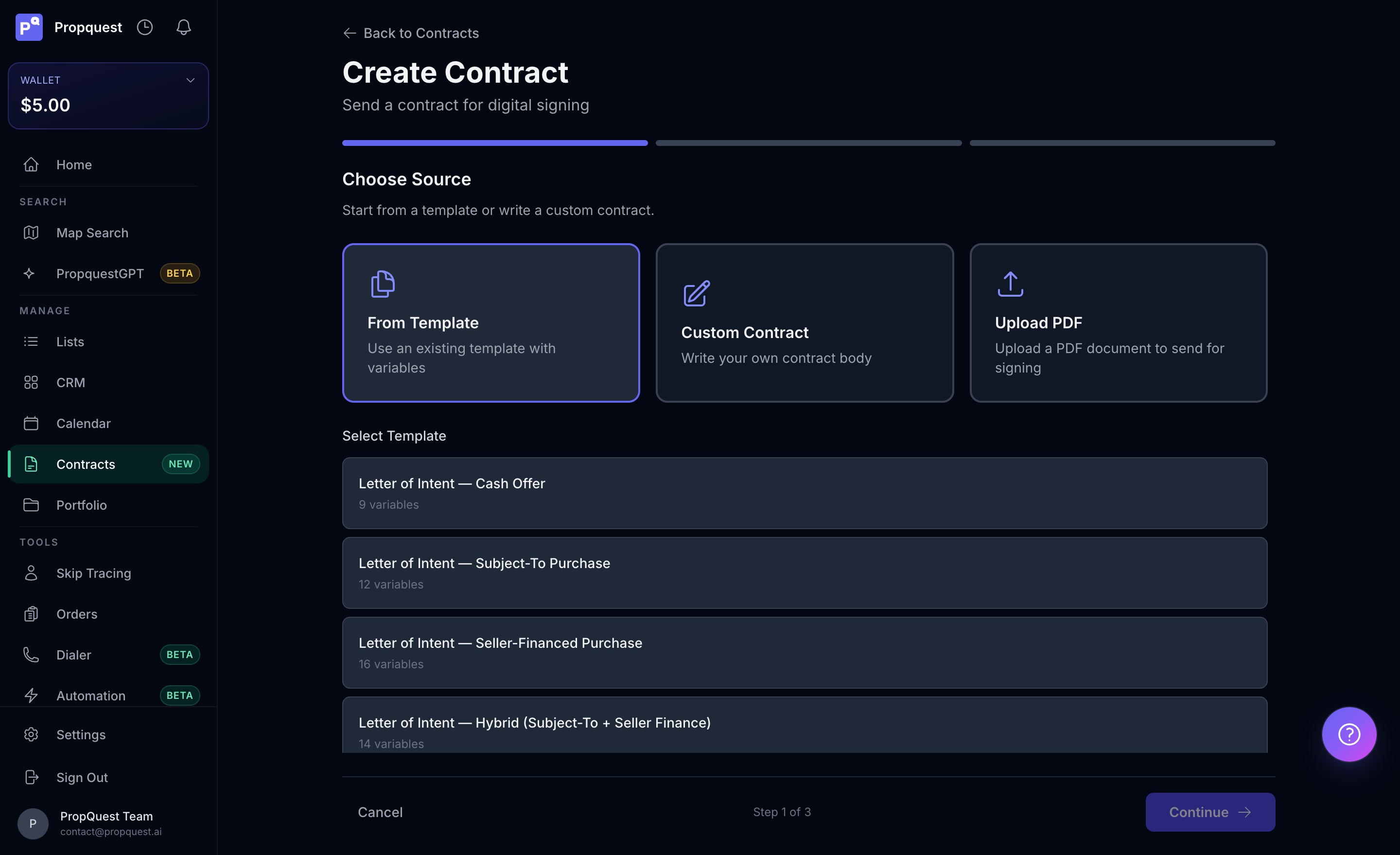
Need something we don't ship? Upload a Word or PDF and we'll detect variables (anywhere you've written {{variable}}). Or book a white-glove session and we'll convert your existing forms in 24 hours.
Editing a template
Open /app/contracts/templates → pick one → Edit. Inline editing covers text changes, variable additions, clause toggles. State-specific clauses are checkboxes at the top — flip them per state and the rendered contract adapts.
Save edits to My templates (your private copy) rather than overwriting the shipped versions — you keep your tuned LOI, we keep updating the canonical ones with new state law without breaking your customizations. Diff against the canonical at any time from the template detail page.
Variable filling
Open a property, hit Send contract, pick a template. PropQuest pre-fills:
- Property address, parcel, legal description (from the report)
- Seller name + mailing address (from skip trace or county records)
- Your buyer entity (saved in account settings)
- Offer amount, EMD, closing date (from your saved MAO + closing pref)
- Any custom variables you've defined on the template
You'll see the fully merged document before it goes out. Tweak anything that's off, save back to the template if you want the change to stick.
Picking the right recipient email
The recipient field defaults to the highest-confidence email from skip trace, but you can override. A few rules of thumb:
- Personal Gmail / Yahoo is the best inbox to target — they actually read it
- Work emails from an obvious employer get ignored or bounced through a spam filter
- No email at all? Send to your own address, then text the seller a link to e-sign from their phone
The CC field lets you add a co-investor or attorney for visibility. They get the open/view/sign notifications too, without being a required signer.
E-signature via Documenso
We send through Documenso — open-source, audit-trailed, court-defensible. The seller gets an email with a unique signing link. You get a notification when they open it, sign it, or decline.
Both parties receive the final signed PDF. We also stash it in the property's documents tab so your records stay clean.
Counter-offers and revisions
When a seller comments on the document instead of signing, you'll see the comment in the contract detail and a notification in the bell. Click Revise to clone the original into a new version, adjust the offer or terms, and re-send. The seller's signing link in the original is automatically invalidated — they sign the new one.
The audit trail preserves every version with timestamps and IPs. If a deal closes and there's later a dispute about which terms were agreed, the chain is on the property's documents tab in order.
Tracking and follow-up
The Contracts dashboard lists every contract you've sent with live status (Sent / Opened / Viewed / Signed / Declined / Expired). Filter by status to triage — "Opened, 24h+, no sign" is the highest-yield follow-up cohort.
Click any contract to see the full audit trail — IP address, timestamps, document version. That's what makes it court-defensible.
Where contracts live after signing
Signed contracts auto-attach to the property's Documents tab and the contact's profile. You also get the PDF emailed to you and the seller, and we keep an archive at /app/contracts/archive searchable by property, date, or counterparty.
Title companies and lenders can be added as CC at signing time, so they get the executed PDF the second it lands. Saves you the "can you forward me the signed PA" email.
Bulk send for marketing offers
For mass-blast LOIs (e.g. 200 sellers in a market at a uniform 60% ARV), use Bulk send from a list. PropQuest renders each contract per-property, pre-fills from each property's report, and queues them for delivery over 24-48 hours to avoid spam flags.
Each send is still individually trackable — opens, views, signs all log per-recipient. Treat this as a campaign, not a transaction: 1-2% sign rate on a cold blast is normal, 4-6% is exceptional. The "no" responses still build your contact database.
White-glove setup
New to the app or coming from another system? Book a white-glove call from the contracts dashboard. We'll:
- Import your existing templates (Word/PDF/Google Docs)
- Map your standard variables (entity, EMD %, default closing)
- Run one end-to-end test send with you on the call
- Hand off — you can send the next 100 LOIs without thinking about it
Common send failures
- "Recipient bounced" — the email address is invalid or the inbox is full. Pick a different email from the skip-trace results or fall back to text + self-send.
- "Template requires variable: legal_description" — the property's legal description didn't pull from public records. Edit the contract and paste it manually, or accept the template's fallback ("the property commonly known as [address]").
- "State requires licensing" — the compliance check fires on first send to IL / OK / PA. Read the modal, confirm you're compliant, and the lock lifts.
- "Send queued — payment failed" — the wallet didn't have enough for the send fee (Free plan only; Pro+ doesn't charge per send). Top up the wallet or upgrade to Pro and the queued sends auto-release.
Compliance notes
Sending real estate offers crosses state lines all the time. Make sure your wholesale or assignment activity matches your state's rules — we surface a compliance hint on first send for states with explicit licensing requirements (IL, OK, PA).